
Free POS app for Android
The cashier for your shop, in your pocket
Niki POS turns an Android phone or tablet into a cashier. Sell, print receipts, track stock and see who pays later, even without internet.
- Free, no limits
- No sign-up
- Works offline

- 1 minutefrom install to your first sale
- 0 limitson products, sales, staff or reports
- 10 typesof business, each set up for you
- 19 languageswith your country's currency and tax
Made for your business
One app, set up for what you sell
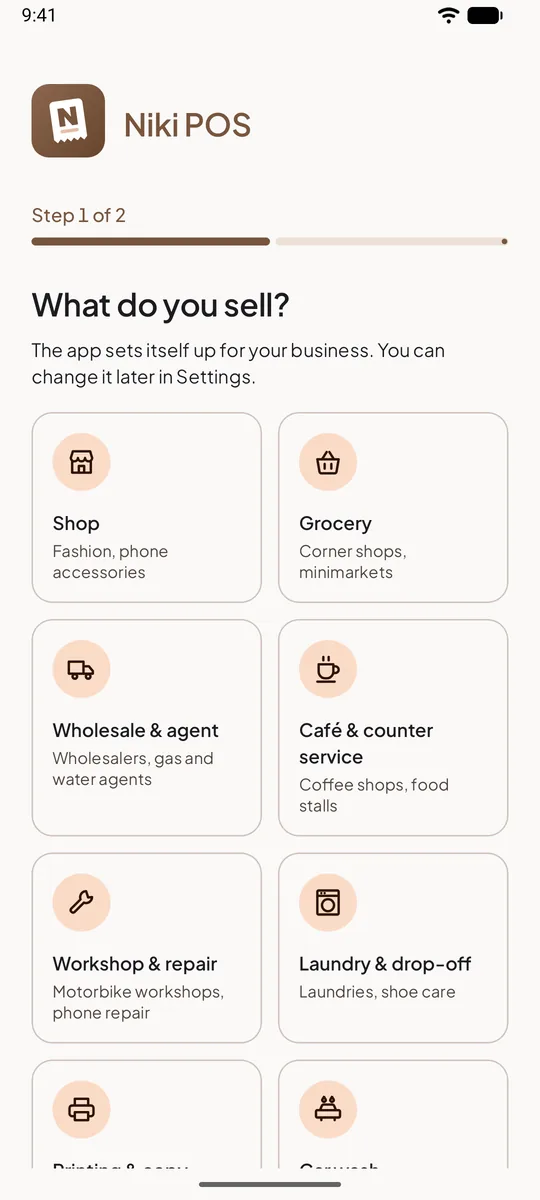
Pick your type of business when you start. Niki POS turns on what you need, adds starter items and uses your business's words: jobs for a workshop, orders by the kilo for a laundry, a queue for a barbershop.
- ShopFashion, phone accessories
- GroceryCorner shops, minimarkets
- Wholesale & agentWholesalers, gas and water agents
- Café & counter serviceCoffee shops, food stalls
- Workshop & repairMotorbike workshops, phone repair
- Laundry & drop-offLaundries, shoe care
- Printing & copyPhotocopying, digital printing
- Car washMotorbike and car washes
- BarbershopBarbers, men's haircuts
- AC serviceAC cleaning, repair, installation
Everything a shop needs
Free, with nothing held back
Staff, shifts, every report and all your history are part of the free app. No watermark on your receipts, no cap on products.
Sell in a few taps
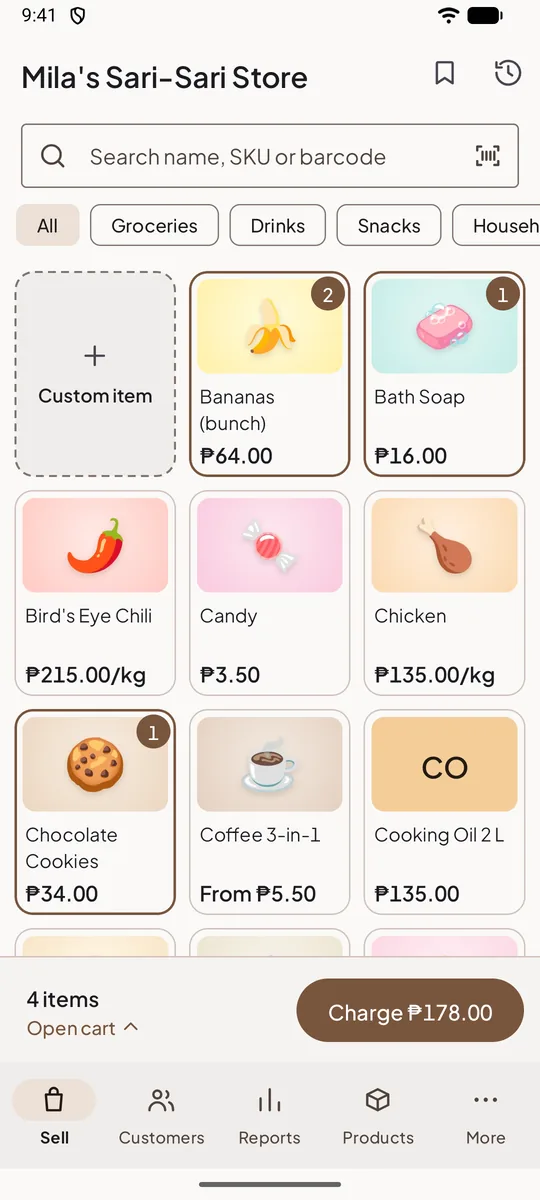
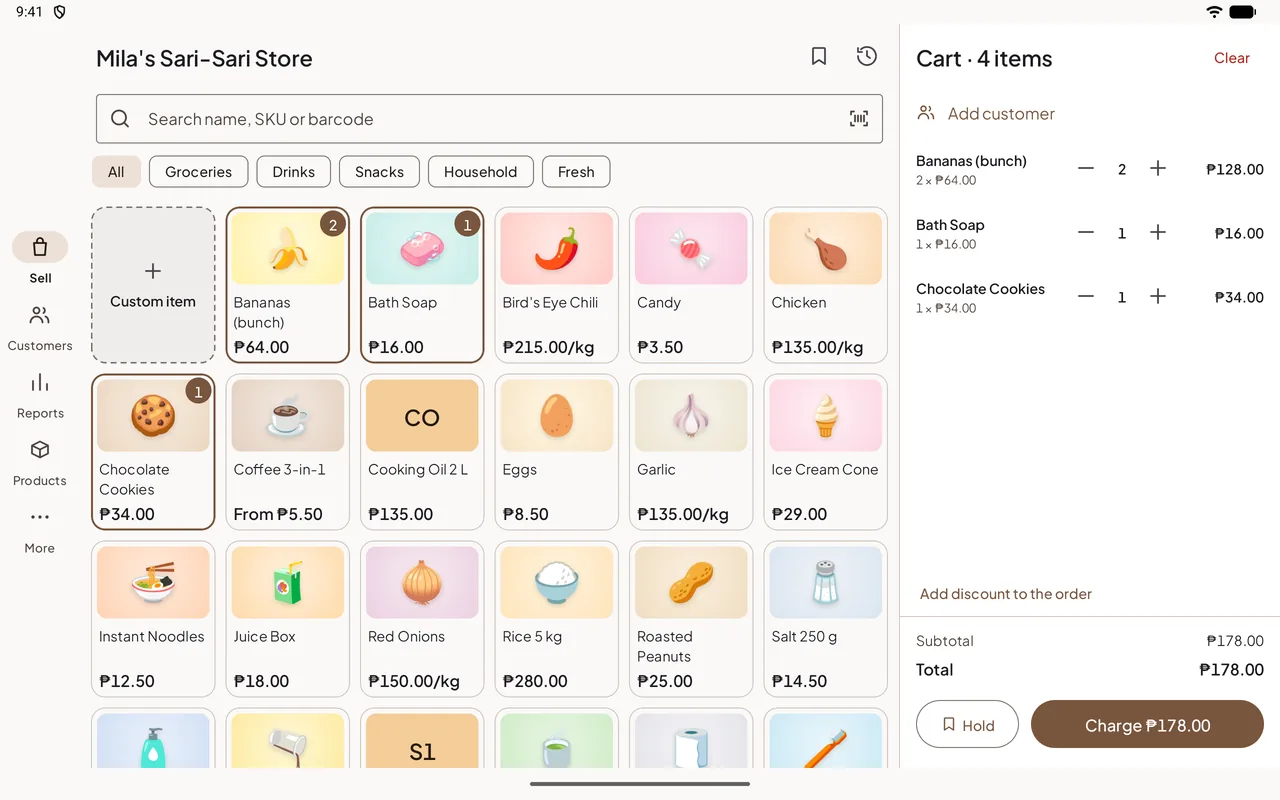
Tap products into the cart, or scan their barcodes. Busy queue? The cart is ready before the customer has their wallet out.
- Search by name, SKU or barcode; scan with the camera or a Bluetooth or USB scanner
- Variants such as size, colour or flavour, and items sold by weight
- Discounts on an item or the whole order, in percent or as an amount
- Hold an order under a name and pick it up later
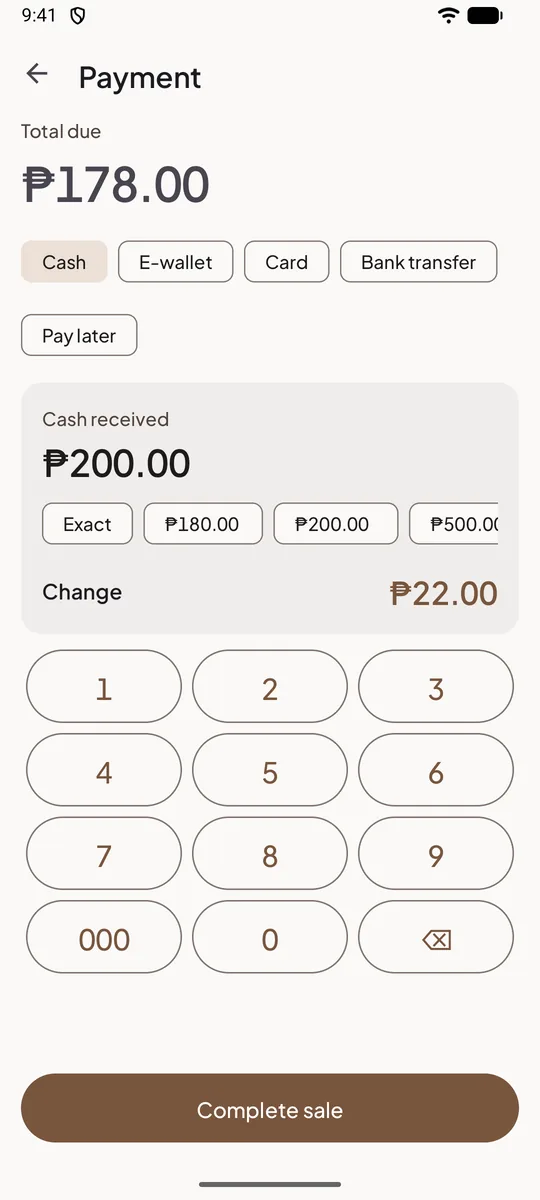
The change, worked out for you
Cash with quick buttons for common notes and the change shown large. QR codes, e-wallets, cards and bank transfers are recorded with every sale.
- Split one bill across several payment methods
- Cash rounding where your country uses it
- Full or partial refunds, with items going back into stock
Niki POS records payments; it doesn't take them. Keep your own QR code and card terminal, with no fees to us.
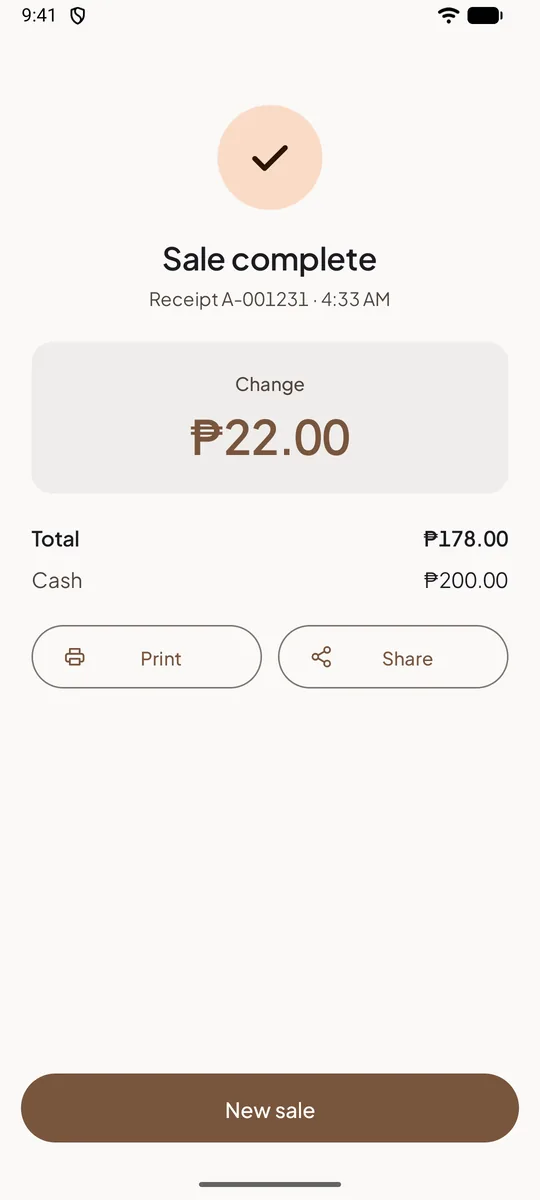
Print it, or send it on WhatsApp
Print on a cheap Bluetooth or USB thermal printer, or the built-in printer of a POS terminal. No printer? Send the receipt as a picture or a PDF.
- 58 mm and 80 mm receipt printers; opens the cash drawer too
- Your logo, header and footer, in the receipt language you choose
- Reprint any receipt from the sale history
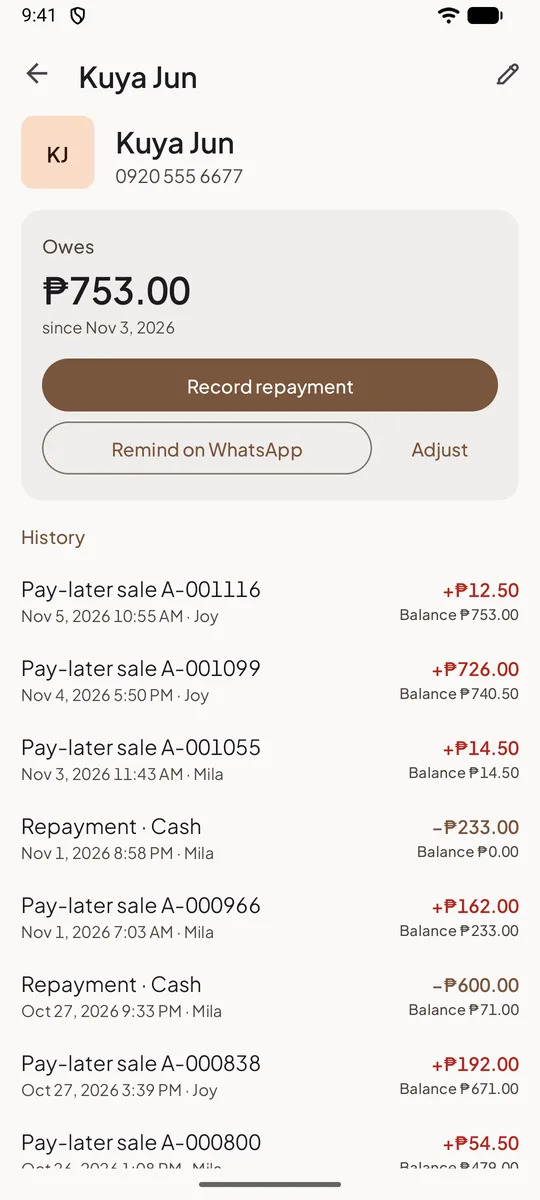
Know who owes you, and since when
Put the unpaid part of a sale on the customer's tab. Their balance, purchases and repayments are kept together, so there's nothing to argue about.
- Record repayments, in full or in part
- Send a friendly reminder on WhatsApp in one tap
- See the total owed to you on the Reports screen
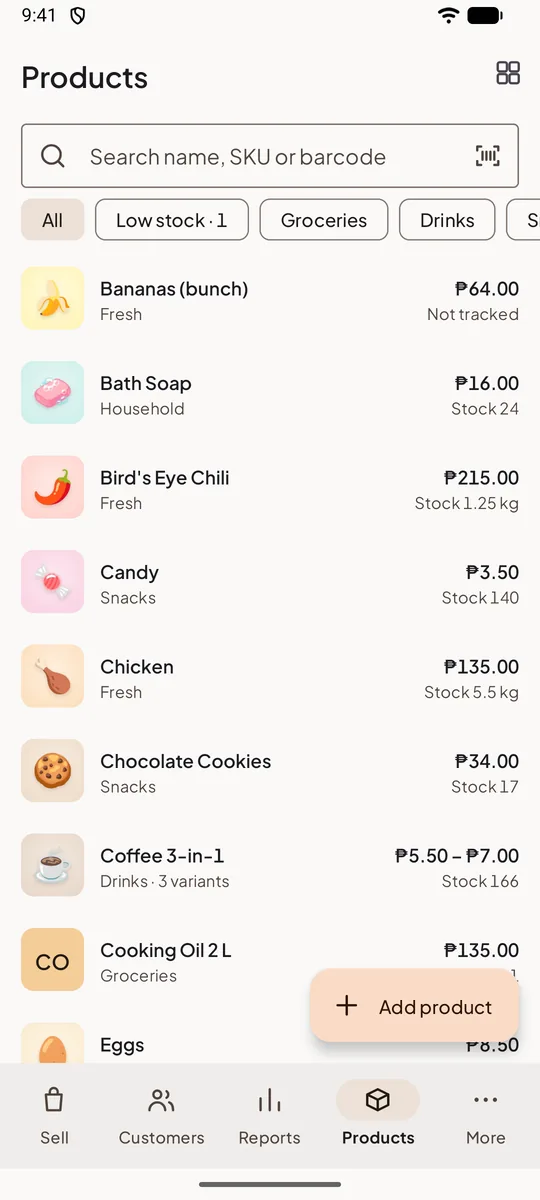
Stock that adds up
Every sale takes items out of stock. Record what comes in and what's damaged, lost or expired, and see each item's history.
- Low-stock alerts at the level you choose
- Cost prices for your profit, seen only by you
- Categories, photos, barcodes and units
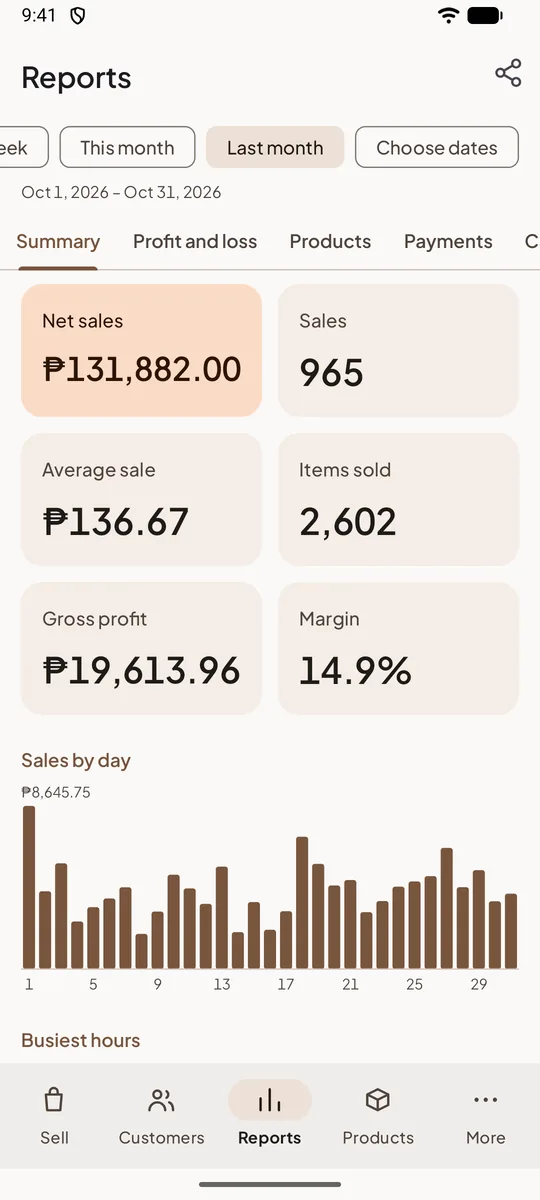
Your profit, every day
Sales, profit and margin for today, this month or any dates you pick. Add your rent, wages and other costs to see what you really keep.
- Best and worst sellers, sales by category and your busiest hours
- Sales by cashier, payment methods and each shift's cash difference
- Expenses and a profit and loss report; export any report to Excel
A PIN for every cashier
Choose what each cashier may do: discounts, refunds, pay later. Cashiers never see your cost prices or profit.
Shifts with a cash count
Open with the starting cash, close with a count, and see straight away if the drawer is short or over.
Your data, your file
Export everything, photos included, to one file for Google Drive or a computer, and import it on a new phone.
Your language and currency
English, Indonesian, Spanish, Arabic, Chinese and 14 more, with your country's currency, tax and payment methods.
No sign-up, no internet
Install it and start selling
There's no account to make and no internet to wait for. Type your shop's name and make your first sale in about a minute. Power cut or no data? Niki POS keeps selling, because everything is kept on your phone.
- Works fully offline, every day
- Runs on Android 7.0 or newer, including cheap phones
- Your data stays on your device unless you turn on Pro's backup
Phones, tablets and POS terminals
Works with what you already have
On a tablet the cart sits next to the products. Add a cheap Bluetooth receipt printer and you have a full counter.
- Phones and tabletsAny Android 7.0 or newer
- POS terminalsSunmi and iMin, with their built-in printers
- Receipt printersBluetooth, USB and network, 58 mm and 80 mm
- Barcode scannersThe camera, or a Bluetooth or USB scanner
Niki POS Pro
When your shop grows
An optional subscription that backs up your shop and lets you watch it from anywhere. Without it, everything above stays free.
14 days free if you haven't had Pro before. Cancel any time.
- Automatic backupLose your phone and your shop comes back on the new one
- Watch your shop from your phoneSales, profit, stock and who owes you, wherever you are
- Daily summary and alertsRefunds, big discounts and cash differences
- Web dashboardReports, Excel exports and price changes in bulk
- More tills and storesProducts, stock and customers shared between them
Questions shops ask
Is it really free?
Yes. Selling, receipts, stock, pay later, staff, shifts and every report are free, with no limit on products, sales or history. Niki POS Pro is optional: you pay only if you want backup, to watch your shop from another phone, or more tills and stores.
Do I need internet or an account?
No. Niki POS works fully offline and needs no account. You only sign in if you turn on Pro, which needs internet now and then to back up.
Does it take card or QR payments?
Niki POS records how each sale was paid, but it doesn't process payments. Keep using your own QR code, e-wallet or card terminal: the money goes straight to you, and we take no fees.
Which printers work with it?
Most ESC/POS thermal receipt printers, 58 mm or 80 mm, over Bluetooth, USB or the network, and the built-in printers of Sunmi and iMin terminals. How to connect a printer.
What happens to my data if I lose my phone?
Without Pro, your data is only on your phone, so export it now and then from More → Export and import. With Pro it's backed up automatically: sign in on the new phone and your shop comes back.
Is there an iPhone app?
Not yet. The till runs on Android, which is what most shops and POS terminals use. With Pro, you can watch your shop from an iPhone in the web dashboard.
Start selling in a minute
Install Niki POS, type your shop's name and make your first sale. No account, no card, no internet needed.
On a Sunmi or iMin terminal? Install Niki POS from its app store.